ML Sharp in ComfyUI: one image to 3D splat in under a second
TL;DR
Apple’s ml-sharp — “SHarp MonoculAr View Synthesis in Less than a Second with a Resolution-Preserving Transformer” — turns a single input image into a 3D Gaussian Splat (.ply) in under a second on a modern GPU. PozzettiAndrea/ComfyUI-Sharp wraps the model as three ComfyUI nodes so you can pipe it into the rest of your graph without touching Python.
Quick disambiguation before you start googling: this is not a sharpening filter. “Sharp” is the model name. ImageSharpen, ImageSmartSharpen+, Fast Unsharp — all unrelated. If you landed here looking to crispen an image, you want a different node.
Setup
- ComfyUI up to date (the wrapper tracks recent versions of the core).
- Custom node: install via ComfyUI Manager (search “ComfyUI-Sharp”) or
git clone https://github.com/PozzettiAndrea/ComfyUI-SharpintoComfyUI/custom_nodes/, then restart ComfyUI. - Model weights:
sharp_2572gikvuh.ptauto-downloads on first run. For offline use, drop it manually intoComfyUI/models/sharp/. - GPU: a modern NVIDIA card with CUDA is the happy path. Apple Silicon works via MPS but check the repo issues for current status.
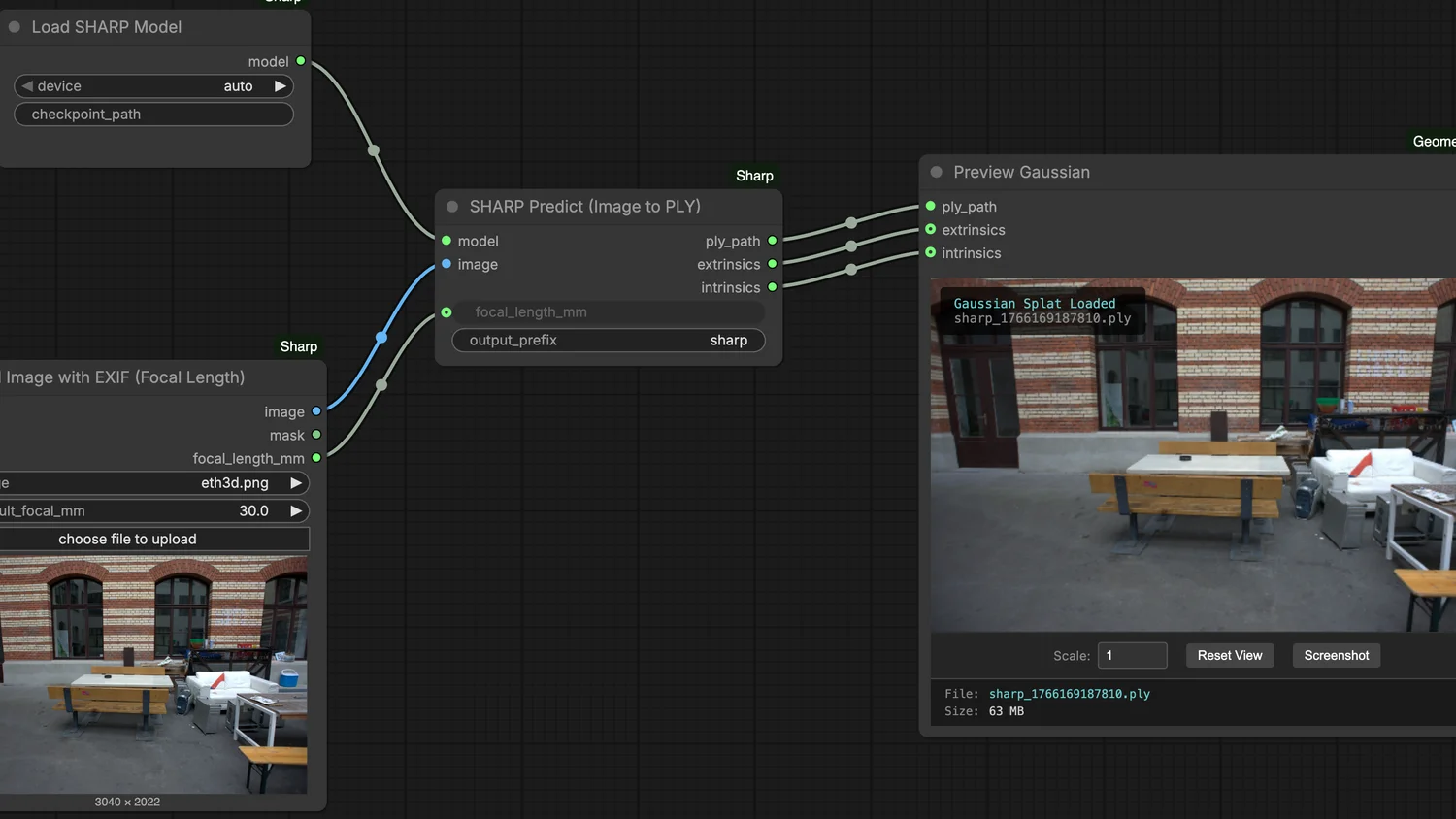
The hero image above is the with_exif workflow diagram from the ComfyUI-Sharp docs, credited to PozzettiAndrea.
The workflow
The wrapper exposes three nodes:
- Load Image with EXIF — loads your input image and, if present, extracts focal length from EXIF metadata. This matters because monocular depth models do measurably better when they know the camera’s actual FOV instead of assuming a default.
- Load SHARP Model — lazy-loads the model weights; keep one instance across multiple
Predictcalls. - SHARP Predict — takes the image + the model and outputs a 3D Gaussian Splat (
.ply).
Minimal graph: Load Image with EXIF → Load SHARP Model → SHARP Predict → your preferred save-to-disk or PLY-viewer node. If your image has no EXIF focal length, the node accepts a manual value — that’s the no_exif variant in the repo’s docs.
Gotchas
- Name collisions. ComfyUI has a handful of unrelated nodes with “sharp” in the name. Pin the exact node:
SHARP Predict (from ComfyUI-Sharp), not anyImageSharpen*variant. - First-run download. The model weight file is not tiny. If your ComfyUI server runs in an air-gapped environment, pre-stage
sharp_2572gikvuh.ptatComfyUI/models/sharp/before the firstLoad SHARP Modelcall. - PLY consumption. Most ComfyUI image nodes won’t do anything useful with a PLY. You’ll want a dedicated viewer — SuperSplat in the browser is the low-friction option; any gsplat-compatible pipeline works for programmatic use.
- License. ml-sharp is under Apple’s own license (restrictive on redistribution / commercial / promotional use). Read it before you ship a product around its outputs.
Links
- Apple ml-sharp: github.com/apple/ml-sharp · project page
- ComfyUI wrapper: github.com/PozzettiAndrea/ComfyUI-Sharp
- Alt fork with slightly different node naming: github.com/zwukong/ComfyUI-Sharp-Gaussian-Splatting-
- PLY viewer: SuperSplat